Showing posts with label VMware backup. Show all posts

Wednesday, January 17, 2018

Avamar 7.5 - what is new?


The latest version of Avamar 7.5 provides a lot of new features in virtualization / cloud / application backup and more.

Presentation with a full list of news in Avamar 7.5:
Video with a discussion of the newest in Avamar 7.5:
              
---------------
Avamar 7.5 appears on the market exactly half a year after the previous version. The speed of development is impressive!


Some of the new features in Avamar 7.5:

  • OpenStack image backupFull backups with reading delta from disk Avamar 7.5 implements its own CBT mechanism that reads only changed data since the last backup. Anyhow we can enjoy the full backup.
    Full backup in couple of minutes with no load of OpenStack.
       
  • HyperV image backup
    Restoring single objects of Exchange / SharePoint / MSSQL from HyperV image level backups
       
  • VMware image backups
    Skipping pagefile.sys during VMware image backups
    It does not make sense to backup pagefile as it is as new one (from scratch) after restore.
    pagefile can be even 16GB large.
    By skipping pagefile Avamar saves money (less backup storage required) and speeds up the backup.
       
  • Disaster Recovery in the Cloud Avamar can clone backups to the cloud.
    We can restore data or start our applications in the Cloud for tests or in case of Disaster Recovery.
       
  • Moving old backups to S3 storage Avamar can move old backup to cheap S3 storage (local or in the cloud) via Data Domain Cloud Tier.
    It saves money and allows efficient use backup storage.
       
  • VMware application consistent backups Avamar backups VMware images and guarantees that SQL backup is consistent.
    We have full backups, backup of logs only, …
    We can restore the image of VM, just SQL databases, or recover database to point in time.
    Cool!
       
  • Restoring only rights of files from VMware image backup
       
  • Tight integration with VMware vCenter
       
  • ...

More information news in Avamar 7.5 in presentation:
and in the video from CEE partner session:
http://dell.mywebinarplace.com/index.php?cmp=attendx_meeting&mt_number=22419936

Monday, July 31, 2017

NetWorker and VMware backup: Extremely fast, ransmoware protection

NetWorker & VMware
NetWorker is currently one of the fastest backup solution for VMware environments:
  • Backup 6000 Virtual Machines in the environment without any problem
  • 100 virtual machines backed up in parallel
  • Full backup of 500 virtual machines per hour in real environment (change ratio of 3% - 5%)

Film / presentation
Video describing NetWorker capabilities in VMware:
Full backup - is it important?
Why do I underline that every VMware backup using NetWorker is full backup?
Restore from full backup is the fastest possible. Just because we restore from single, full copy, we have several hours faster recovery.
And recovery, restore time - this is the most important parameter.

Start virtual machines without recovery? Faster with backup than production?
What if we need to restore the virtual machine immediately? For example:
  • Disaster Recovery in the remote center
  • Analysis of the situation from the historical moment
  • Tests / Development
  • ...
NetWorker / Data Domain offers immediate start of virtual machines just from the backup, without any data restoration.
And important: Virtual Mahines started from NetWorker/Data Domain have huge performance:
  • 1,000 IOPS (DD6300)
  • 10 000 IOPS for DD9800
It can be faster than real production!

Security
NetWorker / Data Domain offers protection against ransomware / hacker attacks. We are sure that neither ransmoware nor hacker (even if he has access to the top level admin passwords) will not delete the backups.
So even if ransomware has encrypted all the production data or hacker erased all the production data - we can always restore from NetWorker/Data Domain! Here data are secure!
Is it difficult to set it up? Just one click away. See slide 51 and further:
Availability
Imagine that the connection between VMware and backup medium has crashed. NetWorker, without interrupting the backup, directs the data transfer to another available connection to the medium. Backup is successful though the one of connection crashed.
The result: Our SLA is still 100%!

Distribution of traffic
NetWorker uses lightweight proxy to backup 25 VMware virtual machine in parallel.
We can implement for example 8 such machines and enjoy 100 parallel backups (10 times more than market average). NetWorker automatically distributes backups / restores between all 8 proxies.
Again: The failure of a single proxy does not affect the backup. We still have 100% SLA backup / restore.

Wizards
Every function is available with wizards (shown in the movie / presentation):
  • Running Virtual Machine directly from backup (1,000 IOps to 10,000 IOps)
  • Repairing (reverting) virtual machine (few minutes for 1TB VM)
  • Restoring virtual machine to new instance
  • Restoring single file
  • Restoring virtual machine without vCenter (Emergency Restore)

Simplicity
The whole VMware backup configuration is extremely simple - as any other backup in NetWorker.
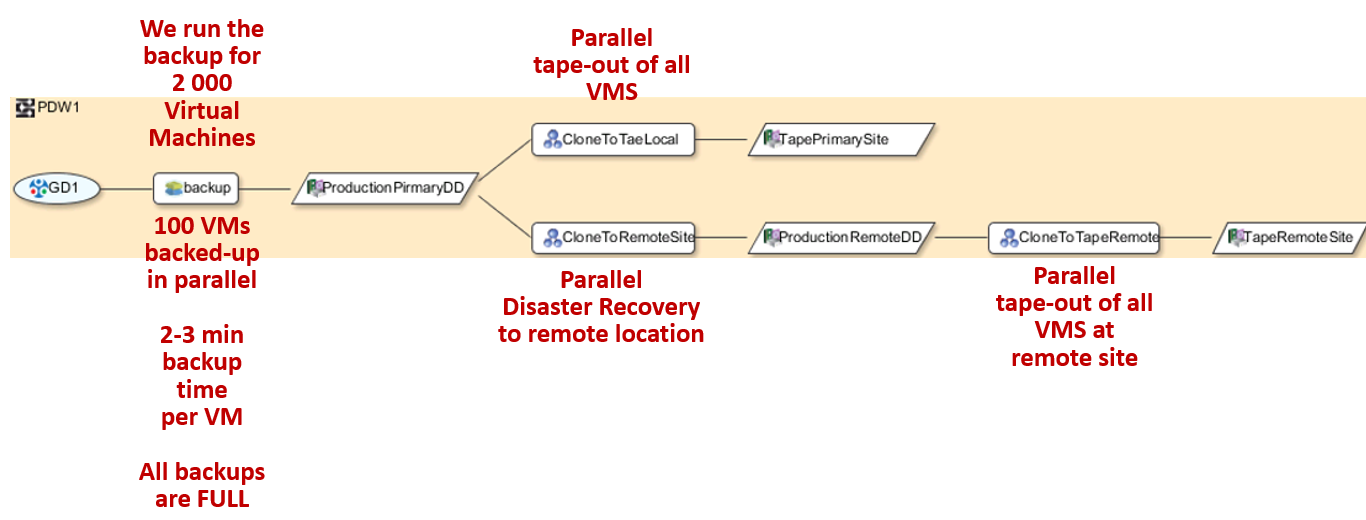
Below screen shows how easy is to achieve in NetWorker the most advanced backup / Disaster Recovery strategy:
  • Backup to local medium (Data Domain) in a primary location (1 month retention)
  • Disaster Recovery: Replication to Data Domain at remote location (2 weeks retention)
  • Local tape out (5 years retention)
  • Remote tape out (10 years retention)
All in just few clicks. We can define:
  • When the replica / tape out should happen
  • Retention
  • Which virtual machines shall be backed up / have Disaster Recovery / taped out
  • …

How much does it cost?
NetWorker has a new way of licensing per processor. Details in the movie / presentation.

More
For more I invite you to the film:
Have a speed ​​and reliability not only in VMware backups!
BackupRecoveryGuy